Permissions
HourBank uses Perfex's own roles and permissions, so you manage them where you already manage your team. Open Setup, Staff, Roles, edit a role, and find the block named HourBank. You can also give one staff member different permissions on their own page.
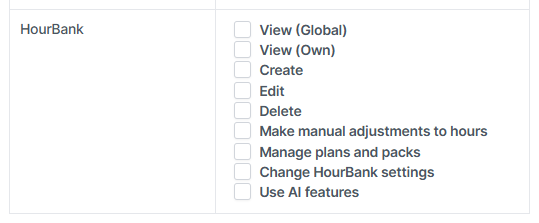
| Permission | What it allows |
|---|---|
| View (Global) | See every agreement, plan, pack, report and the dashboard. |
| View (Own) | See only the agreements where the person is the account manager, and reports for those. |
| Create | Add agreements, and import retainers. |
| Edit | Change agreements, pause, resume, cancel, sell packs, change plans, close requests, sync hours, and approve summaries and entries in review. |
| Delete | Delete draft agreements. |
| Make manual adjustments to hours | Add or remove hours by hand, with a reason. Allow this only for people you trust. |
| Manage plans and packs | Add, change, switch off and delete plans and packs. |
| Change HourBank settings | Open Setup, Settings, HourBank. |
| Use AI features | Open the AI settings, the categories and the usage page. |
Suggested setups
- Account managers. View (Own), Edit. They see and manage only their clients.
- Office or finance. View (Global), Create, Edit.
- Owner or administrator. Everything.
- Everyone else. No HourBank permissions. Their time is still counted, because it comes from the timesheets they already fill in.
Perfex administrators have every permission automatically.
What clients can do
Clients never get staff permissions. In the client area they can only see their own retainers, buy packs you have made available, request more hours and download their statements. Another client's page cannot be opened, even by changing the number in the address.