Install
You install HourBank from inside Perfex. You do not need FTP or a file manager.
Before you start
The file you downloaded from CodeCanyon is a package. Unzip it once on your computer. Inside you will find hourbank-module.zip. That is the file Perfex needs. Do not unzip hourbank-module.zip.
Step 1: Upload the module
- Log in to Perfex as an administrator.
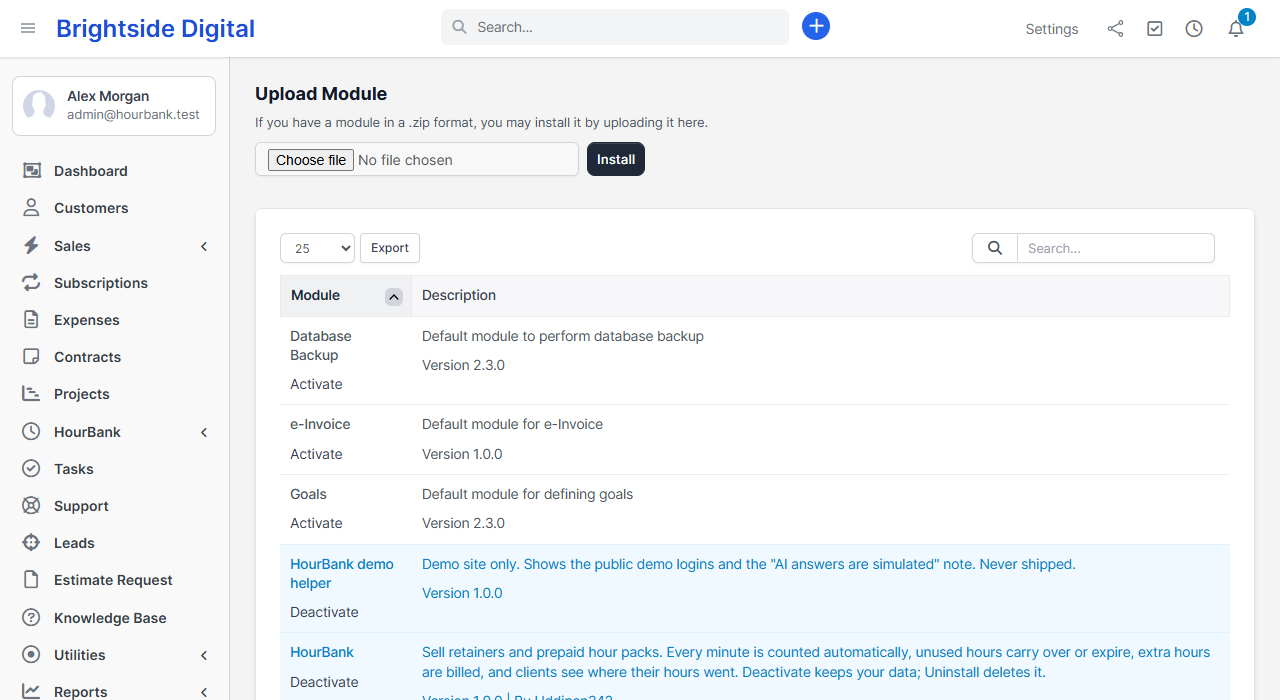
- Open Setup, then Modules.
- Click Upload module, choose
hourbank-module.zipand click Install.
Step 2: Activate it
- Find HourBank in the list of modules.
- Click Activate.
Activation creates the tables HourBank needs and adds a HourBank item to the left menu. It is safe to activate again later. Nothing is duplicated.
Step 3: Open HourBank
Click HourBank in the left menu. The first time, you see the setup wizard. Continue with the setup wizard.
If the upload fails with a message about file size, your hosting limits how large an upload can be. HourBank is small, so this normally means the limit is very low. Ask your host to raise upload_max_filesize and post_max_size to at least 8 MB, or see the questions on the FAQ page.
Installing on a site that already has Perfex data
HourBank only reads your existing tasks, projects, customers and time entries. It adds its own tables and never changes the ones Perfex created. Existing time entries are counted only for retainers you create, and only from the retainer's start date.