Emails and merge fields
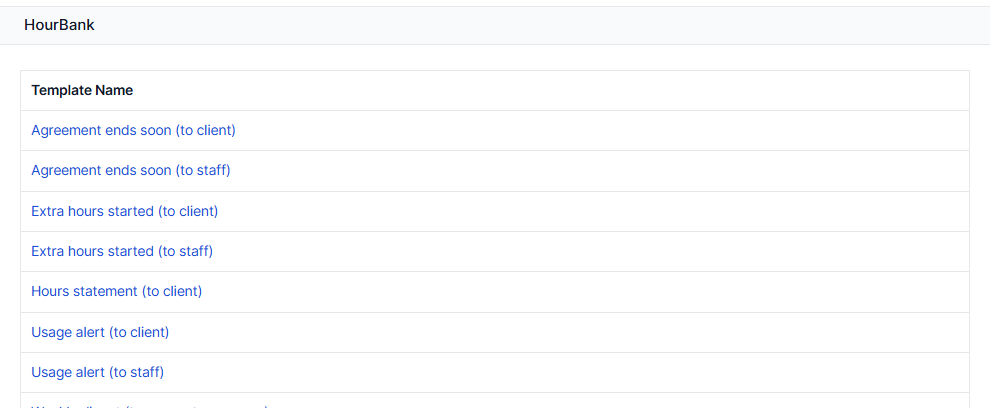
HourBank sends a few emails so you and your clients do not have to watch the hours. They use Perfex's own email settings and appear with the other email templates, so you can edit the wording in Setup, Email templates, under the group HourBank.
The emails
| Sent to | When | |
|---|---|---|
| Usage alert (to client) | The client | When the hours used reach an alert level, for example 75%, 90% and 100%. Once per level per billing cycle. |
| Usage alert (to staff) | The account manager and your team | Same moments as above. |
| Extra hours started (to client and staff) | Client and team | The first time the hours run out in a billing cycle and extra hours begin. Once per cycle. |
| Agreement ends soon (to client and staff) | Client and team | 14 days before an agreement with an end date finishes. Once per agreement. |
| Hours statement (to client) | The client | When a billing cycle ends, with the PDF statement attached, if switched on. |
| Weekly digest | Account managers | Once a week: each manager's agreements, hours left and usage, in one email. Off by default. |
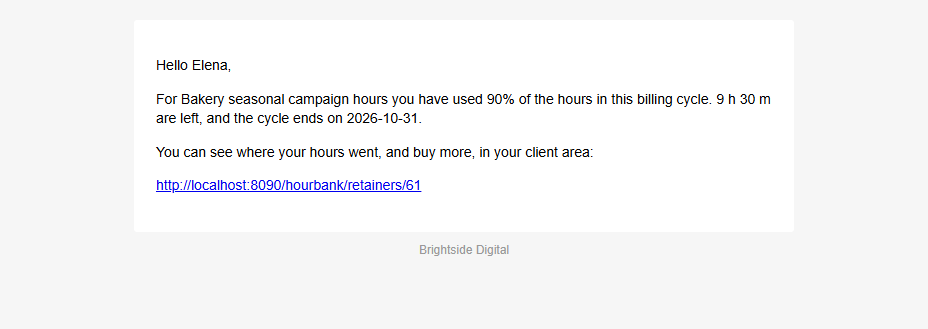
Each alert is sent once. If an alert level was passed and the hours later go back up, for example because a time entry was deleted, the email is not sent again in the same cycle.
Staff also get a message in the Perfex notification bell for usage alerts, extra hours, agreements ending soon and client requests.
Switching emails on and off
In Setup, Settings, HourBank you can turn on or off usage alerts, statements and the weekly digest. In the agreement's advanced options you choose who receives them. You can also switch a template off in Perfex's email templates screen.
Merge fields
Merge fields are placeholders that are replaced with real values when an email is sent. Click Available merge fields on an email template to see the list. You can use these in the HourBank templates:
| Merge field | What it shows |
|---|---|
{hourbank_agreement_name} | The agreement's name |
{hourbank_client_name} | The client's company |
{hourbank_hours_left} | Hours left now |
{hourbank_hours_used} | Hours used in this billing cycle |
{hourbank_hours_total} | Hours available in this billing cycle |
{hourbank_usage_percent} | Percentage of the hours used |
{hourbank_cycle_start}, {hourbank_cycle_end} | The dates of the billing cycle |
{hourbank_extra_hours} | Extra hours used in this cycle |
{hourbank_end_date} | The agreement's end date |
{hourbank_portal_link} | Link to the retainer in the client area |
{hourbank_agreement_link} | Link to the agreement for staff |
{hourbank_ai_summary} | The approved summary of the work done, if AI summaries are on and you approved one |
{hourbank_digest} | The table in the weekly digest |
The usual Perfex merge fields such as {email_signature} work as well.
Emails and testing
While you try HourBank, you may want to avoid emailing real clients. Use a test client with your own address on the contact, or point Perfex's email settings at a mail catcher such as Mailpit while you experiment.